tune::tune_grid(
  object = my_model,
  preprocessor = my_recipe,
  resamples = my_resamples

)Tune Tidymodels in Databricks
Introduction
sparklyr enables you to offload Tidymodels grid search tuning to Databricks. Tidymodels is a collection of packages designed to work together to provide everything from resampling, to preprocessing, to model tuning, to performance measurement.
Model tuning is a time-consuming process because of the number of tuning parameter combinations that need to be evaluated. Running the combinations in parallel saves a significant amount of time. While Tidymodels supports parallel tuning, it does not natively integrate with Spark. sparklyr bridges this gap, making distributed tuning on a cluster straightforward to execute.
In Tidymodels, the tune_grid() function is called to execute the grid search locally. To run in Databricks, simply call sparklyr’s tune_grid_spark() instead. It accepts the same arguments as tune_grid(), see Figure 1.
Run locally
sparklyr::tune_grid_spark(
  object = my_model,
  preprocessor = my_recipe,
  resamples = my_resamples,
  sc = my_conn # Only addition
  )
Run remotely in Databricks
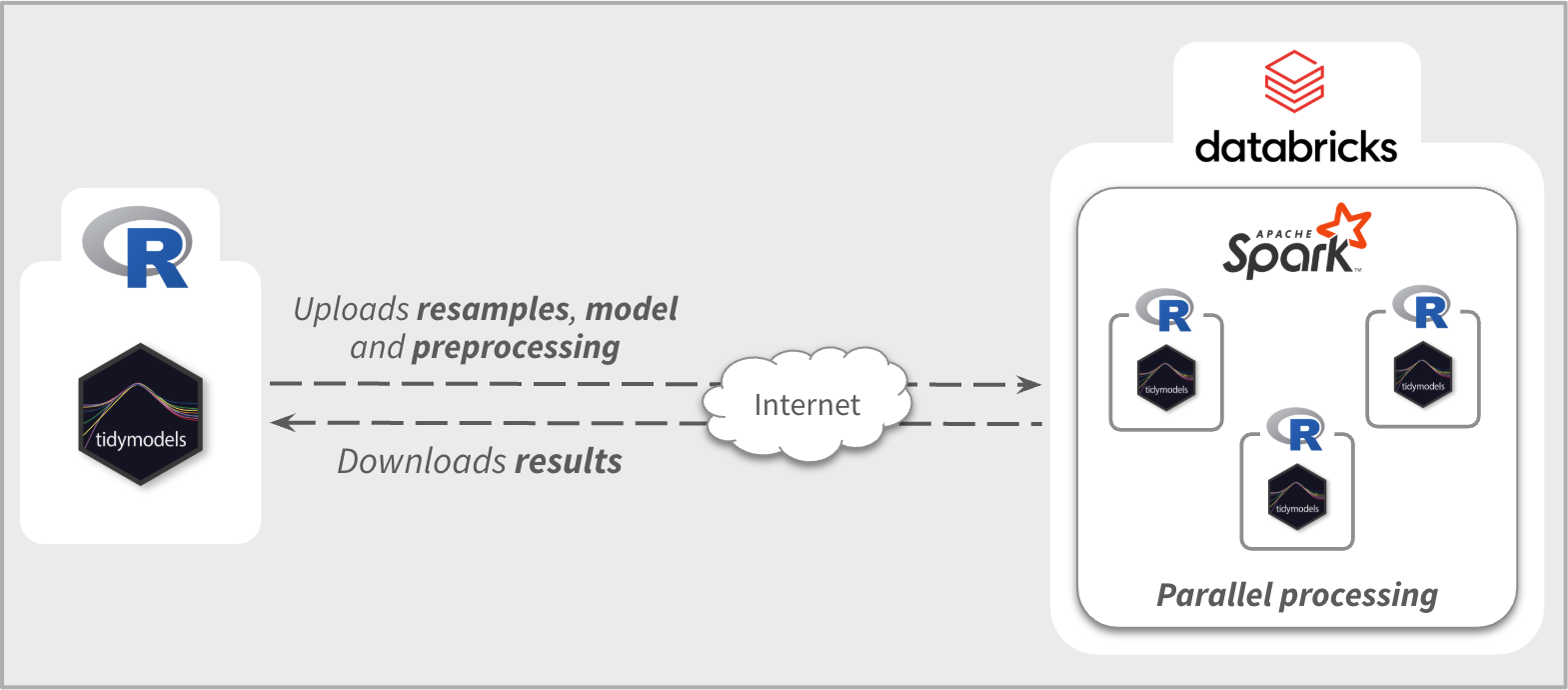
sparklyr will automatically upload the needed R objects to Databricks, such as the resample object, model specification, and the preprocessing steps. It will then run the tuning in parallel, taking advantage of the R integration in Databricks. Lastly, it will collect all of the results back to your local R session, and return a tune_results object that is indistinguishable from one made directly by Tidymodels; see Figure 2.
Example
In Tidymodels, there are some specific elements needed to perform a grid search tuning:
Model specification (
parsnip)Resampled data (
rsample)Data preprocessor (
recipe)Post processor (
tailor) optional
In this example, we define the modeling components exactly as we would for local tuning with tune_grid().
library(tidymodels)
library(readmission)
set.seed(1)
readmission_splits <- initial_split(readmission, strata = readmitted)

# Resampling -------------------------------------------------------
readmission_folds <- vfold_cv(
  data = training(readmission_splits),
  strata = readmitted
  )

# Preprocessing ----------------------------------------------------
recipe_basic <- recipe(readmitted ~ ., data = readmission) |>
  step_mutate(
    race = factor(case_when(
      !(race %in% c("Caucasian", "African American")) ~ "Other",
      .default = race
    ))
  ) |>
  step_unknown(all_nominal_predictors()) |>
  step_YeoJohnson(all_numeric_predictors()) |>
  step_normalize(all_numeric_predictors()) |>
  step_dummy(all_nominal_predictors())

# Model specification -----------------------------------------------
spec_bt <- boost_tree(
  mode = "classification",
  mtry = tune(),       # Parameter to be tuned
  learn_rate = tune(), # Parameter to be tuned
  trees = 10
  )
The only required step before tuning the model in Databricks is to connect to a Databricks’ Spark cluster. Although we could have connected earlier, this demonstrates how easily a local tuning workflow can be migrated to a Databricks cluster.
library(sparklyr)

sc <- spark_connect(
  method = "databricks_connect",
  cluster_id = "0420-225150-twe7n5s0" # Replace with your own cluster's ID
  )
The next step is to call tune_grid_spark(). We will pass the three required elements created in the first step, and the Databricks connection variable. The optional control_grid() call is included here to display the sparklyr output during the tuning process.
spark_results <- tune_grid_spark(
  sc = sc,
  object = spec_bt,
  preprocessor = recipe_basic,
  resamples = readmission_folds,
  control = control_grid(verbose = TRUE)
  )
#> i Creating pre-processing data to finalize 1 unknown parameter: "mtry"
#> ℹ Uploading model, pre-processor, and other info to the Spark session
#> ✔ Uploading model, pre-processor, and other info to the Spark session [676ms]
#>
#> ℹ Uploading the re-samples to the Spark session
#> ✔ Uploading the re-samples to the Spark session [2.3s]
#>
#> ℹ Copying the grid to the Spark session
#> ✔ Copying the grid to the Spark session [259ms]
#>
#> ℹ Executing the model tuning in Spark
#> ✔ Executing the model tuning in Spark [35.3s]
#>
Once complete, the spark_results object is fully compatible with standard tune functions.
autoplot(spark_results)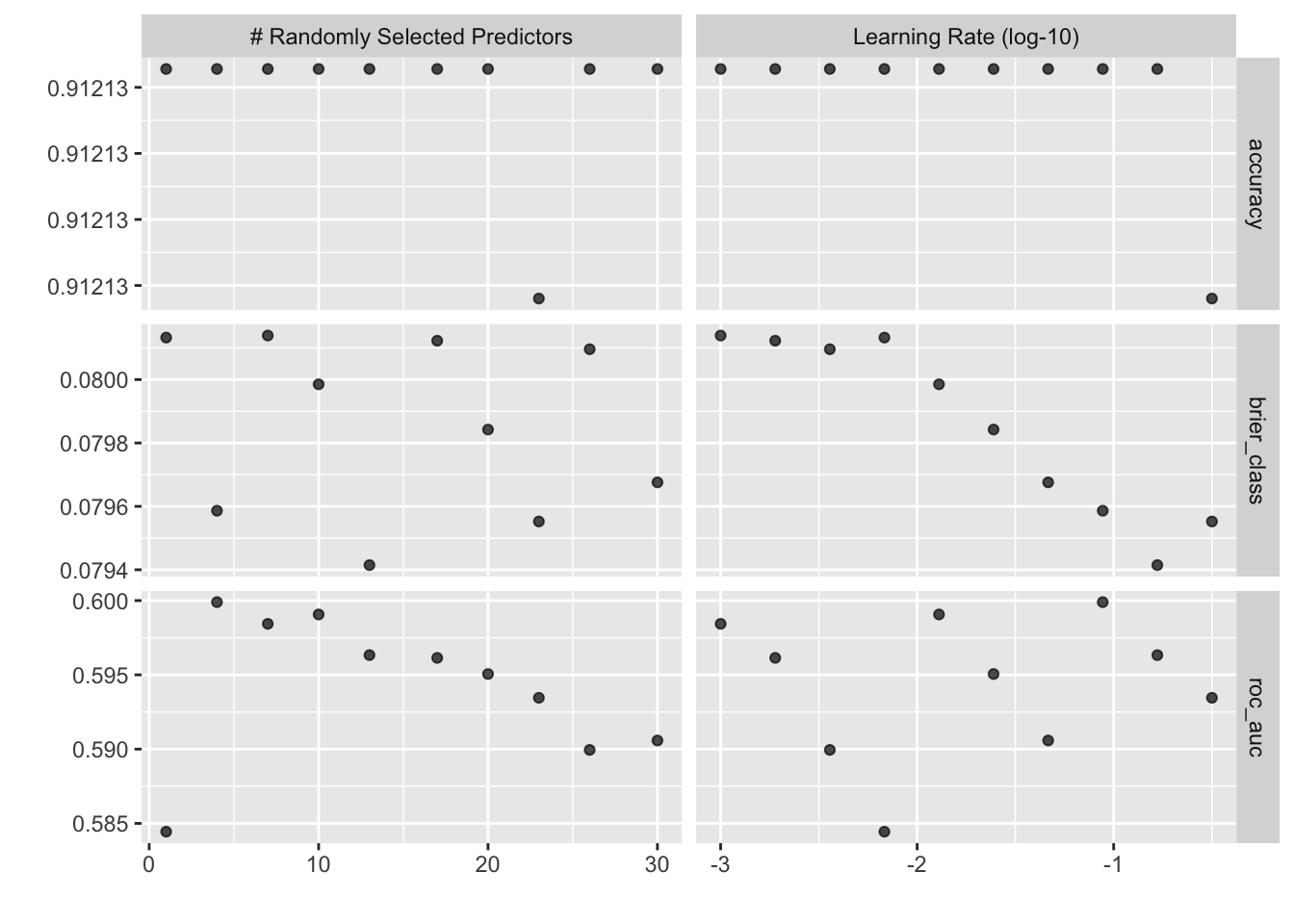
R and Python libraries prerequisites
Before tuning in Databricks, the following Python and R packages must be installed on the cluster:
-
rpy2(Python) -
tidymodels(R) -
reticulate(R) - Any R packages required by the
parsnipengine (e.g.,xgboostorranger).
There are two options to accomplish the installation, the first via the Databricks portal, the second by installing the libraries programmatically.
Option 1 - Databricks Web Portal
The most common method is to use the Databricks UI. It is a straightforward process managed through the cluster’s Libraries tab. Detailed instructions can be found here: Databricks - Cluster Libraries.
Option 2 - Programmatic installation via brickster
For those who prefer a scripted approach, the brickster package is a complete toolkit for interacting with Databricks. It can be used to programmatically install the Python and R libraries, provided the user has permissions to modify the target cluster.
library(brickster)

# DBRs have a fixed snapshot date to source the R packages. Redirecting
# to the 'latest' snapshot to get the most recent package versions.
repo <- "https://databricks.packagemanager.posit.co/cran/__linux__/noble/latest"

# Builds the list of R packages, pointing them to the 'latest' snapshot
r_libs <- libraries(
  lib_cran("reticulate", repo = repo),
  lib_cran("tidymodels", repo = repo),
  lib_cran("xgboost", repo = repo) # (optional) Used in the example
)

db_libs_install("0420-225150-twe7n5s0", r_libs)

# Builds the Python package object. Specifying the version of `rpy2` to install.
py_lib <- lib_pypi("rpy2==3.5.6") |>
  libraries()

db_libs_install("0420-225150-twe7n5s0", py_lib)
Over time, there may be other modeling R packages that need to be installed on the cluster. Here is a template that can be used to install a single package:
library(brickster)

lib_cran(
  package = "[Missing package]",
  repo = "https://databricks.packagemanager.posit.co/cran/__linux__/noble/latest"
  ) |>
  libraries() |>
  db_libs_install("[Your cluster ID]", libraries =  _)
Considerations
-
Local vs Remote results - It is possible that results from tuning a model locally will differ from those returned from Databricks. Differences in operating systems, R runtime, and libraries between the local machine and those in the Databricks cluster will affect the calculations. However, re-running the same tuning in the same Databricks cluster will return the same results if a seed is set in the local R session.
sparklyrensures that the seeds are set the same way Tidymodels does for the local tuning. - Parallelism - There are two ways to set the parallelism for tuning performed in Databricks. The default method tunes over resamples; the second tunes over all combinations of resamples and parameters. For a full explanation of how parallelism works in this kind of distributed computing, please refer to Tune Tidymodels in Spark - Parallel Processing
-
Size of the data – The main goal of
tune_grid_spark()is to accelerate the search, not to process “big data.” If you need to tune models using data too large to fit in local memory, consider using Spark ML directly. The downside is that Spark ML requires an entirely different setup and codebase than Tidymodels. -
Retrieving predictions -
sparklyrsupports downloading predictions from each parameter and resample combination. Keep in mind that this will roughly double the amount of data downloaded from Databricks. In most cases this is not a problem, but for a very large resampled dataset it may become one. To learn how to turn that feature on, see Tune Tidymodels in Spark - Retrieving predictions
Conclusion
We’ve taken care to ensure that tune_grid_spark() works exactly like tune_grid(). There’s no need to recode your logic or learn a new syntax; you just connect to the cluster and submit the job. Since many companies already provide access to Databricks, this workflow allows you to take full advantage of existing infrastructure with minimal effort.
Offloading heavy grid searches to a cluster saves significant time you can reinvest in deeper experimentation or faster stakeholder reporting. The next time you need to tune a model, give this a try and see how much faster your workflow becomes.